GatherFull
Clarity and coordination for complex,
volunteer-driven events.


Project Overview
An AI-powered coordination system for community event teams, bringing planning, volunteer management, and communication into one place. By connecting organizers, volunteers, and community stakeholders, it creates a clear and intuitive workflow from the first task to the final debrief.
This project was inspired by real community event coordination challenges, where managing volunteers and information often becomes overwhelming.
The context
Community events are a cornerstone of local culture, from holiday celebrations to large scale festivals. Unlike commercial events, they are often run almost entirely by volunteers, with coordination handled by community members alongside their everyday responsibilities.
This creates a unique challenge. Managing an event requires coordinating logistics, communication, budgets, and people across multiple roles, without dedicated staff or a centralized system. As a result, information is often scattered, responsibilities are unclear, and maintaining alignment throughout the process becomes difficult.
The Challenge
"I always feel like I'm missing something. I never really know what's going on."
Volunteer-driven events are inherently complex, involving coordination between people with different roles, availability, and responsibilities. Without a clear structure, this complexity leads to scattered information, unclear ownership, and difficulty maintaining alignment.
As a result, managing the event becomes reactive rather than controlled, making it difficult to stay on top of tasks and make confident decisions.
Research & Insights
User Research Key insights
To gain a deeper understanding of the challenge, I conducted user interviews, a survey, and firsthand observation of community event coordination, alongside a competitive analysis.
The research explored the needs, workflows, and pain points of event managers, volunteers, and other community stakeholders involved in event coordination.
Lack of
real-time visibility
Participants struggle to stay updated on event progress, often relying on fragmented communication channels. This makes it difficult to understand what is happening at any given moment.
“A lot of information gets lost. If I’m offline for a couple of hours, there are already hundreds of messages.”
Decisions are made
without reliable data
Participants described relying on memory and informal communication when assigning tasks, often without access to up-to-date information about availability, workload, or past experience.
Unclear ownership
creates confusion
Responsibilities are not always clearly defined, leading to overlap, missed tasks, and inefficiencies in coordination.
“It often feels messy. It’s not always clear who is responsible for what, and sometimes several people step into the same area and things get lost.”
Knowledge is not
captured for future use
Insights and feedback from events are rarely documented in a structured way, limiting the ability to learn, improve, and plan more effectively over time.
“During the event everyone has feedback. A week later, everyone is back to their routine, and by next year we're making the same mistakes again.”
Competitive Analysis
To identify gaps in existing solutions, I examined both the tools and services available for managing community events, as well as the methods commonly used in practice.
Manual Coordination (Excel, Messaging Apps)
The most common approach in practice, relying on spreadsheets and messaging groups to manage event logistics
Strengths
-
Familiar and easy to use.
-
Accessible and free.
-
Flexible and adaptable.
What’s missing
-
Information is fragmented across multiple tools, groups and channels.
-
No real-time updates, notifications or alerts.
-
Requires constant manual effort to stay updated.
-
No structured way to assign or track volunteer tasks and responsibilities.
Community Management Platforms
Tools designed to support ongoing community operations and communication
Strengths
-
Purpose-built for managing communities.
-
Support personalized communication and information sharing.
-
Support member and activity management.
What’s missing
-
Limited flexibility for event-specific needs.
-
Focused on community members rather than internal coordination.
-
Do not support volunteer-based event workflows.
Volunteer Management Tools
Platforms designed to assign roles and track volunteer activity
Strengths
-
Easy assignment of roles and tasks.
-
Clear overview of volunteers' responsibilities.
-
Supports communication with volunteers.
What’s missing
-
Not designed for full event management.
-
No budget tracking or real-time visibility.
-
Limited visibility across the entire event process.
Research Synthesis: Key Gaps
Bringing together insights from user research and competitive analysis, several key gaps emerge in how community events are currently managed:
Gap 1
Lack of a centralized and shared information source
Event coordination relies on scattered tools in practice, while existing solutions tend to focus on specific functions such as communication, task management, or volunteer coordination. This creates fragmented workflows and prevents a complete overview of event coordination.
Gap 2
No structured coordination of roles and responsibilities
Participants struggle to clearly assign and track responsibilities, and while some tools support task management, they do not reflect the dynamic and multi-role nature of volunteer-driven community events.
Gap 3
Limited visibility for real-time decision-making
Coordinators lack a clear overview of progress, workload and, resource allocation, and existing tools do not provide a unified view to support real-time decisions.
Gap 4
No continuous loop of learning and improvement
Although feedback is generated during events, neither current practices nor existing tools provide a structured way to capture insights and apply them to future planning.
The opportunity
Project Goal
To enable community event teams and volunteers to move from scattered coordination to a clear, structured way of managing events, with shared visibility across tasks, roles, and progress.
Persona

Noa Friedman
"I always feel like I'm missing something. I never really have a clear picture of what's going on.."
Age: 36
Role: Volunteer Community Event Manager, Moshav in Central Israel
Tech proficiency: High
Background
Noa has been living in the moshav for over 15 years and is an active member of the community. This year, she took on the responsibility of managing the Shavuot event, including coordinating volunteers, assigning roles, and overseeing event logistics.
Alongside the operational aspects, she is also responsible for administrative tasks such as budget approvals and ensuring the event runs smoothly from planning through execution.
She takes on this role voluntarily, alongside her job and other commitments.
Motivations
-
Stay on top of tasks, responsibilities & updates.
-
Maintain a clear and up-to-date view of overall event progress.
Needs
-
Clear ownership of assigned tasks.
-
Visibility into task status and completion.
-
A centralized place to manage all event-related information in one place.
-
A simple way to capture insights after the event.
Frustrations
-
Losing track of tasks and updates across multiple platforms and tools.
-
Unclear ownership leading to confusion, overlap or duplicated work.
-
Lack of visibility into what is completed and what is still pending at any given time.
-
No structured way to summarize and learn from the event.
UX Insight
Coordinators like Noa don’t just need better tools, they need a system that provides clarity, structure, and real-time visibility, allowing them to manage complex events without constantly chasing information.
Ideation & Concepts
Building on the research insights, I defined the dashboard as the central interface for managing the event. I then explored different directions to understand how information, tasks, and actions should be structured within it.
Workflow-based dashboard

A layout organized by task status, structuring work into stages such as urgent, to-do, in progress, pending approval, and completed, making progress easier to follow.
This approach emphasizes clarity and helps users track progress and understand what requires attention at each stage.
However, it focuses primarily on task execution and lacks a broader overview of the event as a whole.
AI-centered dashboard

A layout where the AI assistant plays a central role in the interface. Core elements such as tasks, volunteer messaging, and budget are organized around the AI, with progress indicators supporting the overall view.
This approach reduces manual effort by guiding users through actions and surfacing relevant information dynamically, but limits overall visibility and user control.
Structured Overview Dashboard

A layout structured around key event domains, allowing users to manage different aspects such as volunteers, approvals, logistics and budget in parallel within one view.
The design includes quick access to frequently used areas and highlights key elements such as urgent tasks and AI-supported actions.
While it improves overall visibility, it does not clearly prioritize what requires immediate attention.
Final Direction
The final direction builds on the strengths of each concept, combining task progression, structured visibility, and AI-supported guidance into a single cohesive dashboard that supports both execution and informed decision-making.
The Solution
From Concept to Design
Each concept explored a different priority, whether it was broad information visibility, AI-driven guidance, or structured task and progress tracking.
Rather than selecting a single direction, the design evolved by combining these approaches into a more balanced solution.
The goal was to create a system that supports both understanding and action, allowing coordinators to stay informed while efficiently managing tasks and decisions.
Solution Overview
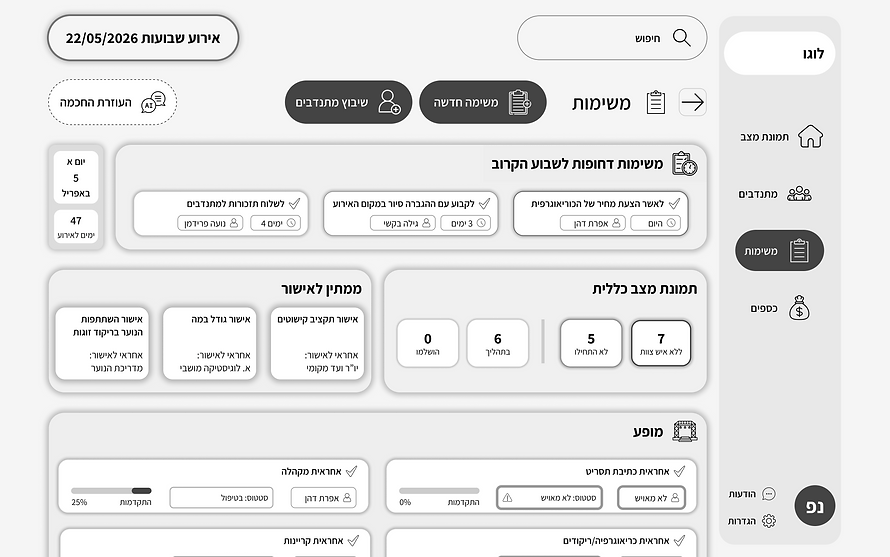
The solution is a centralized event management dashboard, bringing together event progress, urgent tasks, issue tracking, spatial planning, and AI support into a single interface.
It provides a clear, real-time view of the event while enabling coordinators to take action without switching between multiple tools.
Insight
Event coordinators constantly shift between planning, reacting to issues, and tracking progress.
During the design process, it became clear that separating these elements across multiple views creates friction and slows down decision-making.
This led to the decision to consolidate key elements such as urgent tasks, issues and gaps, event layout, and AI support into a single, unified dashboard, allowing coordinators to stay oriented and act quickly.
Key Features
Unified event overview
A real-time overview combining event progress, timeline, and budget status in a single view.
Allows coordinators to quickly understand the current state of the event at a glance.
Urgent focus & issue tracking
Highlights urgent tasks alongside emerging issues and gaps.
Helps teams stay proactive and address issues before they become critical.
Integrated event map
Provides a visual representation of the event layout, connecting planning with physical execution.
Improves on-site coordination and spatial awareness.
AI-powered coordination
An integrated assistant that surfaces relevant information, suggests actions, and supports decision-making.
Reduces manual effort and helps coordinators act quickly under time pressure.
All-in-one workspace
Brings together tasks, volunteers, communication, and planning tools into one unified environment.
Eliminates the need to switch between multiple platforms and keeps all information in sync.
User Flows
Use Case: AI-Based Volunteer Task Assignment
Primary actor: Event Manager
Trigger: Task is unassigned
Goal: Assign the best-matched volunteer
Preconditions:
-
User is logged in
-
Unassigned tasks exist
-
Volunteer data is available
Main Flow
-
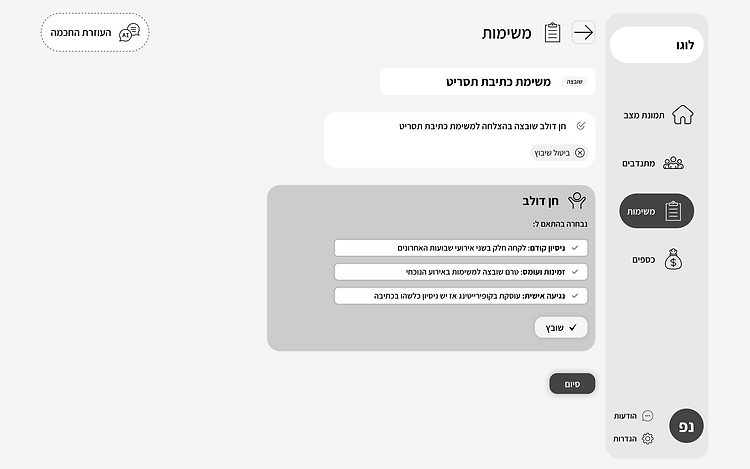
From the main dashboard, Event Manager opens the Tasks page.
-
System displays all tasks with status overview.
-
Event Manager clicks the "Not Assigned" status filter.
-
System displays filtered view showing only unassigned tasks.
-
Event Manager clicks "Assign Volunteer" button on one of ths tasks.
-
Overlay opens with "Manual" and "AI assignment" options.
-
Event Manager selects the "AI Assignment" option.
-
System navigates to AI Recommendations page.
-
System displays 3 recommended volunteers in cards, Each card shows: Previous experience, Availability & workload, Personal connection. Best match is highlighted with medal icon and different background color.
-
Event Manager reviews recommendations and clicks "Assign Volunteer" on chosen Volunteer.
-
Confirmation page displays selected volunteer details with "Cancel" and "Finish" buttons.
-
Event Manager clicks "Finish" to confirm.
-
System assigns volunteer to task and returns to Unassigned Tasks page. System removes assigned task from the list.
Postconditions:
-
Volunteer is assigned to the task.
-
Task no longer appears in unassigned tasks list.
-
Volunteer receives notification (implied).
While assigning volunteers is a key part of running the event, coordinators also need to reflect on the overall outcome and capture insights for future events.
Event Summary & Insights Generation Flow

Wireframes
AI-Based Volunteer Task Assignment
.png)


Adapting to the Event Lifecycle
The dashboard adapts to different phases of the event, shifting from planning and coordination to reflection and summary once the event is completed. In this phase, the system supports coordinators in generating insights and documenting outcomes efficiently.
Event Summary & Insights Generation


.png)


.png)